It drafts the work. I decide how far it goes.
Kyvara is the private AI command center I built to run my own businesses. It keeps the context, drafts the work and asks before it acts. It runs on its own only where I have switched that on.
What it is
One place that knows the business.
I run more than one business, and the context for each was spread across a CRM, an inbox, a calendar, a drive and my own head. Kyvara pulls that into one place: the people, deals, projects and rules, kept as memory I have approved.
On top of that memory sit named agents, each with one job. They read what comes in, work out what matters and prepare the next move. Then they stop and ask, unless it is a kind of move I have cleared in advance.
It is private. I built it for my own work and I use it every day. It holds my businesses, so there is no login I can send you to. What I can show you is how it is put together.
The rule it runs on
- Prepare clean context.
- Draft before executing.
- Ask for approval before consequences.
- Expand autonomy slowly.
In practice, as of November 23, 2026: 20 kinds of outside action are registered, such as sending a text, changing a CRM record or placing a block on the calendar. 18 of them need my click every time. The other 2 belong to one outreach agent: a text reply, and a tag and status on the contact. Those can go out without a click, but only while I have that lane switched on, and only inside set hours and its own guard rails.
How it is organised
Four layers, and a gate on the way out.
Everything Kyvara does sits in one of four layers. Between a draft and the outside world stands an approval, and unless I have decided otherwise, that approval is me.
Context
What it knows: approved memory, business facts, people, projects, rules and history.
Connections
What it can reach: the CRM, the inbox, the calendar and the drive. Read-first, and each one switched on deliberately.
Capabilities
What it can do: clean up intake, write the daily brief, read the pipeline, queue the work and draft the reply.
Cadence
When it acts by itself: a short list of timers, such as a morning brief and an inbox check every fifteen minutes. They prepare and advise. They do not send.
Kyvara drafts
A reply, a CRM change, a task or a note.
My approval
A click, by default. What skips it is narrow, and switched on by me.
It goes out
And the action is written to the log.
A day with it
What it actually does between morning and night.
- Morning brief
- A short read of what needs me today: deals, tasks, approvals waiting, and the memory that matters for them.
- Command feed
- Incoming texts and CRM activity arrive already read, ranked and paired with a drafted reply. I edit and send, or I skip.
- Deal desk
- Comparable sales pulled and an offer range worked out with the numbers shown, so the arithmetic is done and the decision is still mine.
- Inbox watch
- Every fifteen minutes it checks the inbox and prepares what needs an answer. It never changes the mailbox on its own.
- End of day
- A short debrief that turns the day into notes for tomorrow. Nothing becomes lasting memory until I approve it.
- On the phone
- An iPhone companion for approvals and the brief, linked to the same account. Still being built out.
The agents
Each one has a job, and a limit.
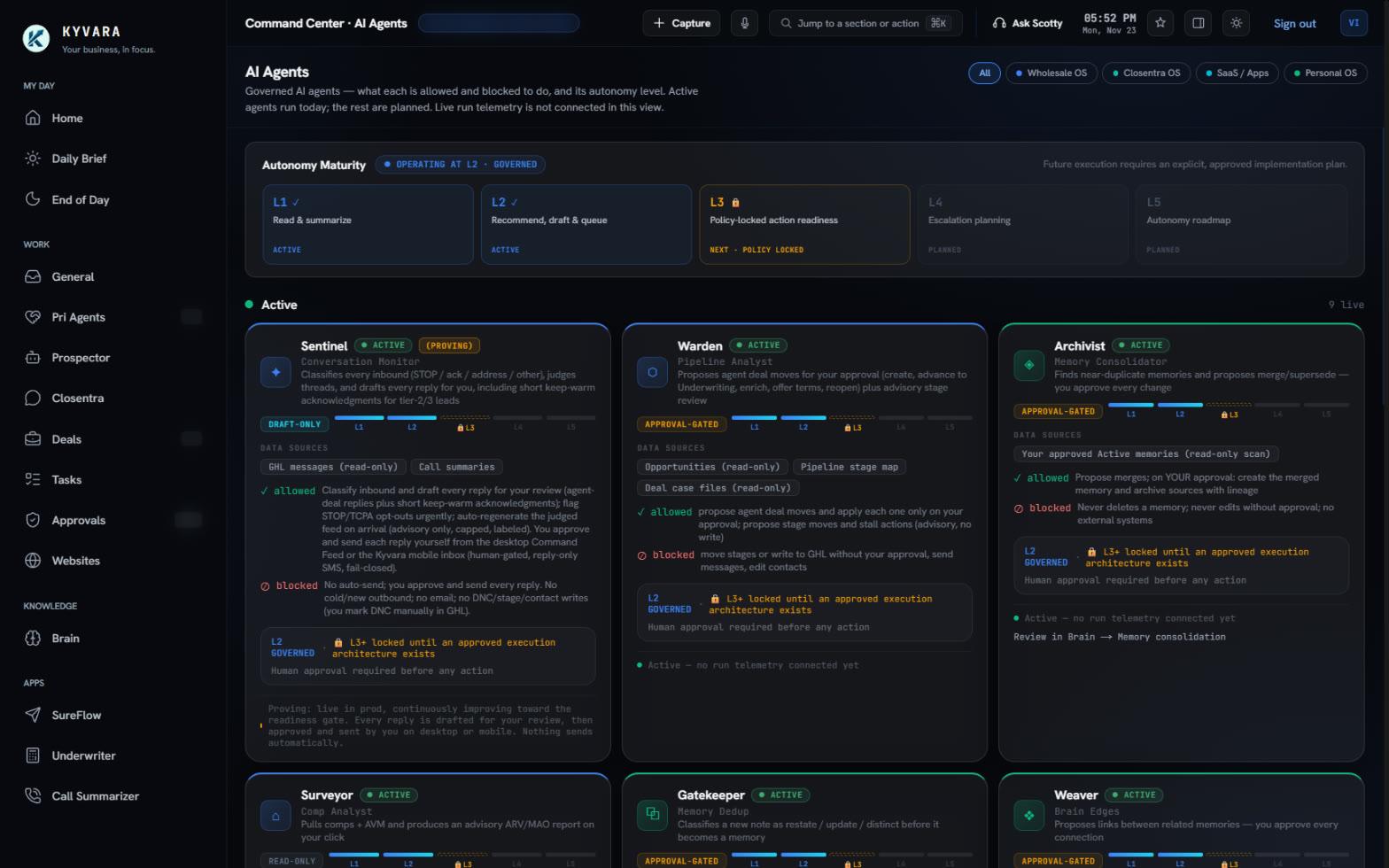
Every agent carries a mode that says how far it may go. These are the 9 on Kyvara's Command Center, the screen pictured above: 1 only drafts, 1 only reads, and 7 wait for my approval. None of them acts on its own. The outreach agent mentioned earlier is governed separately and is not in this list.
| Agent | Job | Mode |
|---|---|---|
| Sentinel | Conversation monitor | Drafts only |
| Warden | Pipeline analyst | Needs approval |
| Surveyor | Comp analyst | Read only |
| Nyx | Night watch | Needs approval |
| Vesper | Day recap | Needs approval |
| Archivist | Memory consolidator | Needs approval |
| Gatekeeper | Memory de-duplication | Needs approval |
| Weaver | Links between memories | Needs approval |
| Liaison | People and company linking | Needs approval |
Scale
By the numbers
Read from the code on November 23, 2026. These count what was built. They are not claims about what it earned.
- First commit
- May 8, 2026
- Commits
- 3,474
- Merged pull requests
- 686
- Database migrations
- 186
- Test files
- 2,399
- AI roles, each pinned to a model
- 45
Built with
Ordinary tools, used carefully.
Kyvara was built with AI coding agents, under the same rule it runs on: they draft, the tests check, and I review before anything is merged. Each AI role inside it is pinned to the model that suits the job, and every call is logged and counted against a daily budget.
- Next.js
- TypeScript
- Supabase
- Postgres with row-level security
- Railway
- Anthropic, OpenAI and Google models behind one router
- Claude Code and Codex as coding agents
For a smaller business
The same pattern, at the size of a shop.
A local business does not need dozens of AI roles. It needs the same pattern at its own size: one or two jobs handed to AI, a draft a person can read, and a clear yes before a customer ever hears from it.
That is how I set up automation for the businesses I work with, and it is what I show owners how to run themselves.
Have something that should run itself?
Tell me what your team keeps doing by hand. If it is worth building, I will scope it. If it is not, I will say so.